
SecretFlame Test (2026): Das unzensierte Studio, das unsere #1 geworden ist
Wir haben secretflame.ai , bezahlt, explizite Prompts durch jede Engine gejagt, die Renderings gestoppt, jede Generierung auf den Cent genau nachgerechnet und alle sieben Bonus-Tools ausprobiert. Das Ergebnis ist das einfachste KI-Studio für Erwachsene, das wir je genutzt haben - und der erste wirklich unzensierte Generator, der gut genug ist, um Mage von der Spitze unseres Rankings zu stoßen. Makellos ist er nicht. Aber es fällt verdammt schwer, ihn wieder wegzulegen.
Der beste unzensierte Allround-Generator, den wir getestet haben: ein aufgeräumtes, sehr intuitives Studio, das uneingeschränkte Bilder und Videos in unter einer Minute baut, Undress-, Face-Swap-, Carousel- und Duo-Tools mitbringt und fehlgeschlagene Generierungen automatisch erstattet. Bei Gratis-Credits ist SecretFlame knauserig, und die „Realistic“-Engine hat einen Bug - aber nichts anderes kommt hier so nah an „funktioniert einfach“ heran.
SecretFlame auf einen Blick
Wenn du nur eine Box liest, dann diese.
TL;DR - lohnt sich SecretFlame?
Ja - und es ist unsere neue #1. SecretFlame macht genau das, woran fast jedes andere Tool in dieser Kategorie scheitert: Es steht dir nicht im Weg. Das Studio ist sauber aufgeräumt, alles ist sofort erreichbar, Generierungen lassen sich ohne Gefummel wiederverwenden, und die mobile Seite ist wirklich gut. Hinter dieser freundlichen Oberfläche ist es komplett unzensiert - explizite Einzelbilder, Image-to-Video, Text-to-Video, dazu Undress-, Face-Swap-, Carousel- und Duo-Tools - und die Ergebnisse kommen schnell zurück, meistens in unter einer Minute.
Perfekt ist es nicht. Im Gratis-Tarif gibt es knauserige zwei Credits, du zahlst also praktisch sofort. Die „Realistic“-Bild-Engine ignorierte einen komplett expliziten Prompt und lieferte uns eine Frau im Pullover (die „Vivid“-Engine traf denselben Prompt danach punktgenau). Der Bildeditor zaubert gelegentlich einen zusätzlichen Arm oder ein zusätzliches Bein dazu, und Chat- oder Companion-Funktionen gibt es gar nicht. Aber die Trefferquote über alle Tools hinweg lag bei etwa zwei Dritteln guten Ergebnissen, Fehlschläge lassen sich billig neu versuchen, und wenn ein Job wirklich scheiterte, wurden die Credits automatisch erstattet. Diese Kombination - freizügig, schnell, günstig pro Clip und ohne Gefummel - bekommt hier sonst niemand hin.
Wo SecretFlame im Markt steht (und warum es unsere neue #1 ist)
SecretFlame ist der Allrounder, der die Grundlagen endlich sauber hinbekommt. Es holt die beste Gesamtwertung auf NSFW Arena. Trotzdem muss man sauber einordnen, wobei. Mage ein anderes Tool weiter vorn liegt: beim Umfang des Kreativstudios und bei stabilen Figuren - allerdings stoppt es bei Erotik und geht nicht in den völlig uneingeschränkten Bereich. SecretFlame geht weiter, bleibt dabei zugänglich, und genau deshalb zieht es für das Publikum dieser Seite vorbei.
Im Vergleich mit spezialisierten Erwachsenen-Generatoren wird der Abstand größer. Wo Seduced AI Video hinter einer Bezahlschranke und einem hakeligen Builder versteckt, lässt dich SecretFlame auf Abruf animieren - für einen Bruchteil des Preises. Wo SoulGen dich durch einen Krypto- und Geschenkkarten-Bezahlvorgang schickt, nimmt SecretFlame eine normale Karte und erstattet fehlgeschlagene Generierungen automatisch. Und wo Nastia AI dir mitten im Vorspiel ein Upsell reindrückt und kein stabiles Gesicht halten kann, rendert SecretFlame einfach das, was du angefordert hast. Nur Candy AI ist ihm in einem einzigen engen Punkt überlegen - als dauerhafte Chat-Begleitung -, und genau das will SecretFlame gar nicht sein.
Wie wir Generatoren für Erwachsene bewerten
Jedes Tool auf NSFW Arena wird nach demselben 10-Punkte-Raster bewertet - gewichtet danach, wofür die jeweilige Kategorie tatsächlich da ist.
1. Qualität der Bildgenerierung - Realismus, Stimmigkeit, Artefaktrate.
2. Videogenerierung - Verfügbarkeit, Qualität und ob du sie wirklich nutzen kannst.
3. Anpassung & Kontrolle - Engines, Länge, Auflösung, Vorlagen, Ausgangsbilder.
4. Content-Freiheit - wie weit die NSFW-Bandbreite wirklich reicht.
5. Wiederverwendung & Charakterkonsistenz - ob du ein Gesicht oder eine Generierung über mehrere Shots hinweg wiederverwenden kannst.
6. Oberfläche & Bedienbarkeit - Einstieg, Klarheit, Reibung, mobile Nutzung.
7. Preis & Gegenwert - was echte Nutzung am Ende wirklich kostet, in Dollar.
8. Testphase & Einstieg - kannst du es einschätzen, bevor du zahlst?
9. Extras & Werkzeugkasten - Undress, Face-Swap, Carousel, Duo, Photoshoot.
10. Privatsphäre & Sicherheit - Bezahlvorgang, Rückerstattungen, Altersprüfung, Richtlinie zu echten Personen.
Minute null: das aufgeräumteste Studio der Kategorie
Erster Eindruck, ungefiltert: alles ist simpel und sofort verständlich. Wenn du noch nie einen KI-Generator benutzt hast: Du tippst eine Beschreibung ein, wählst eine „Style Engine“, klickst auf Generieren, und rechts landet ein Bild oder Clip in der Warteschlange. Viel einsteigerfreundlicher als SecretFlame wird es in dieser Kategorie kaum. Es nennt sich selbst ein Studio, und der Begriff passt.
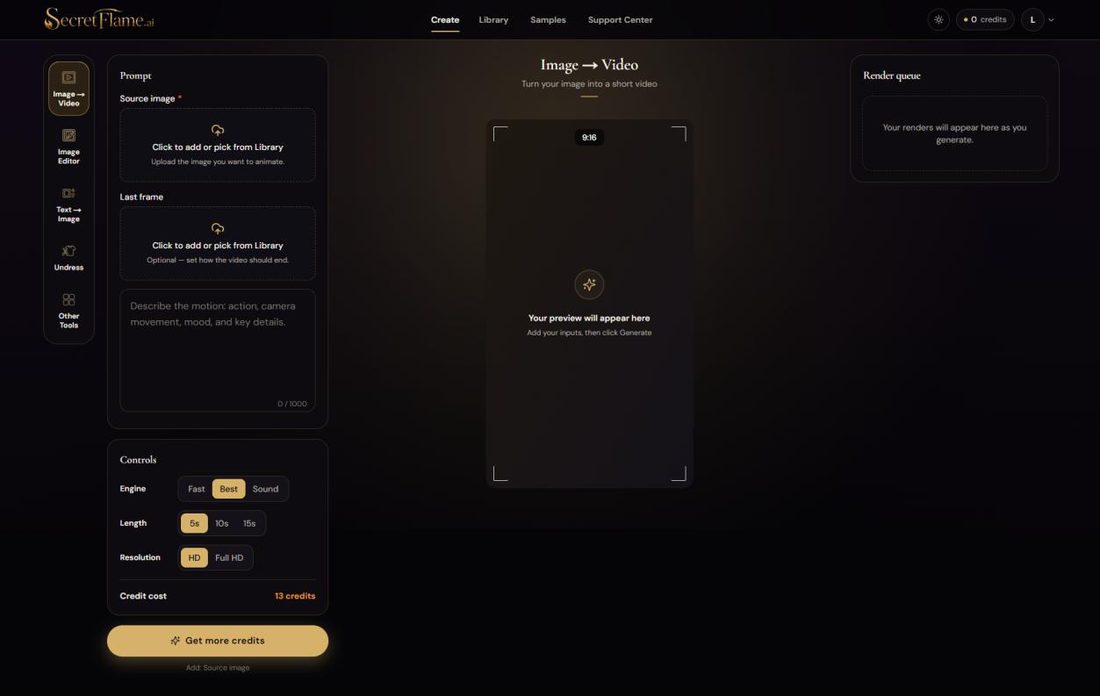
Hier ist die Aufteilung, weil du sie in etwa zehn Sekunden verstanden hast:
Linke Seitenleiste - die Tools: Image → Video, Image Editor, Text → Image, Undress, plus eine Other Tools-Schublade mit sieben weiteren.
Mittlere Spalte - dein Prompt, ein Source image-Feld (zum Hochladen anklicken oder aus deiner Library wählen), ein optionaler Last frame, und eine Live-Vorschau.
Regler unten links - Engine (Fast / Best / Sound), Length (5s / 10s / 15s), Resolution (HD / Full HD) und ein laufender Credit cost, der sich bei jeder Änderung aktualisiert.
Rechte Leiste - die Render queue, in der fertige Generierungen landen und sich mit einem Klick wiederverwenden, erneut starten oder direkt in ein anderes Tool schieben lassen.
Die Wiederverwendung mit einem Klick ist der Teil, der SecretFlame leise wie ein Premium-Tool wirken lässt: Jedes fertige Bild hat einen „Use in“-Menü, das den Treffer direkt in Image → Video, den Image Editor oder AI Photoshoot schickt. Bereits hochgeladenes Material lässt sich genauso easy wiederverwenden. Kein erneutes Hochladen, kein Dateigesuche. Das UI-Urteil unseres Testers war trocken: Sie ist „so intuitiv wie ein neues iPhone“ und die mobile Version ist genauso gut - das konnten wir in dieser Kategorie bisher über kein anderes Tool schreiben.
Die „Other Tools“-Schublade mit sieben Tools
Jenseits der vier Hauptmodi zeigt die Other Tools-Schublade, wie groß SecretFlame denkt. Das ist keine Text-zu-Bild-Seite mit einem einzigen Trick. Das Ding will ein komplettes Studio sein. Hier ist das volle Set, wortwörtlich aus der App:
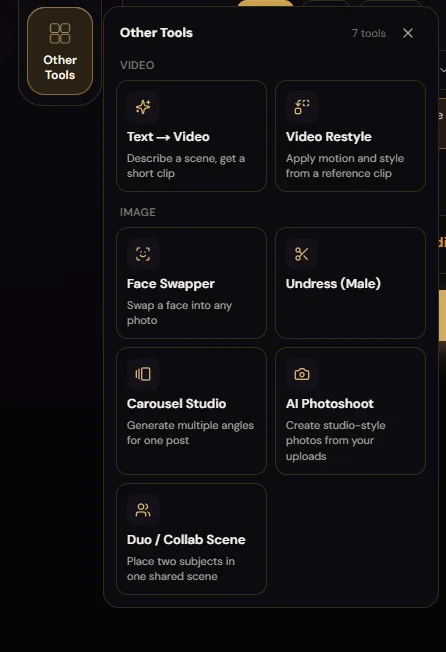
Text → Video - beschreib eine Szene und du bekommst einen kurzen Clip (kein Ausgangsbild nötig).
Video Restyle - übernimmt Bewegung und Stil aus einem Referenzclip.
Face Swapper - tauscht ein Gesicht in ein beliebiges Foto.
Undress - entfernt Kleidung aus einem hochgeladenen Foto (auch mit männlichem Modus).
Carousel Studio - erstellt mehrere Blickwinkel desselben Motivs für einen einzelnen Post.
AI Photoshoot - erstellt Studiofotos aus deinen Uploads.
Duo / Collab Scene - setzt zwei Motive in eine gemeinsame Szene.
„Realistic" lügt, „Vivid" liefert
Unser erster echter Test war ein komplett expliziter Text-zu-Bild-Prompt. Innerhalb von zwei Klicks zeigte SecretFlame gleichzeitig seine beste und seine nervigste Seite.
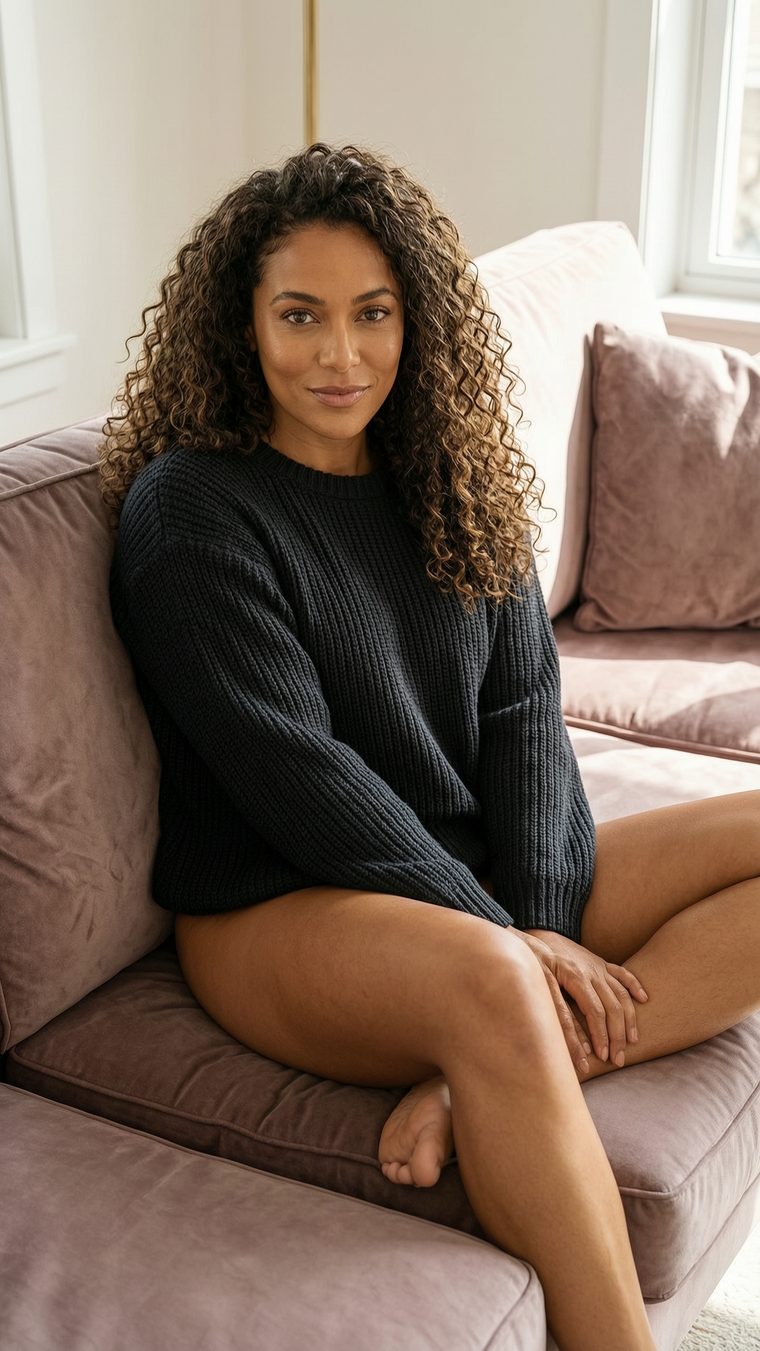
Der Prompt, unverändert: „amazing sexy brunette with curly hair, 24 years old, brown eyes, completely naked, on the sofa, legs spread, showing her pussy.“ Wir nahmen die Engine, die wie die sichere Standardoption klingt - Realistic - und bekamen ein völlig harmloses Foto einer Frau im Pullover . Die komplette explizite Hälfte des Prompts wurde stillschweigend ignoriert.
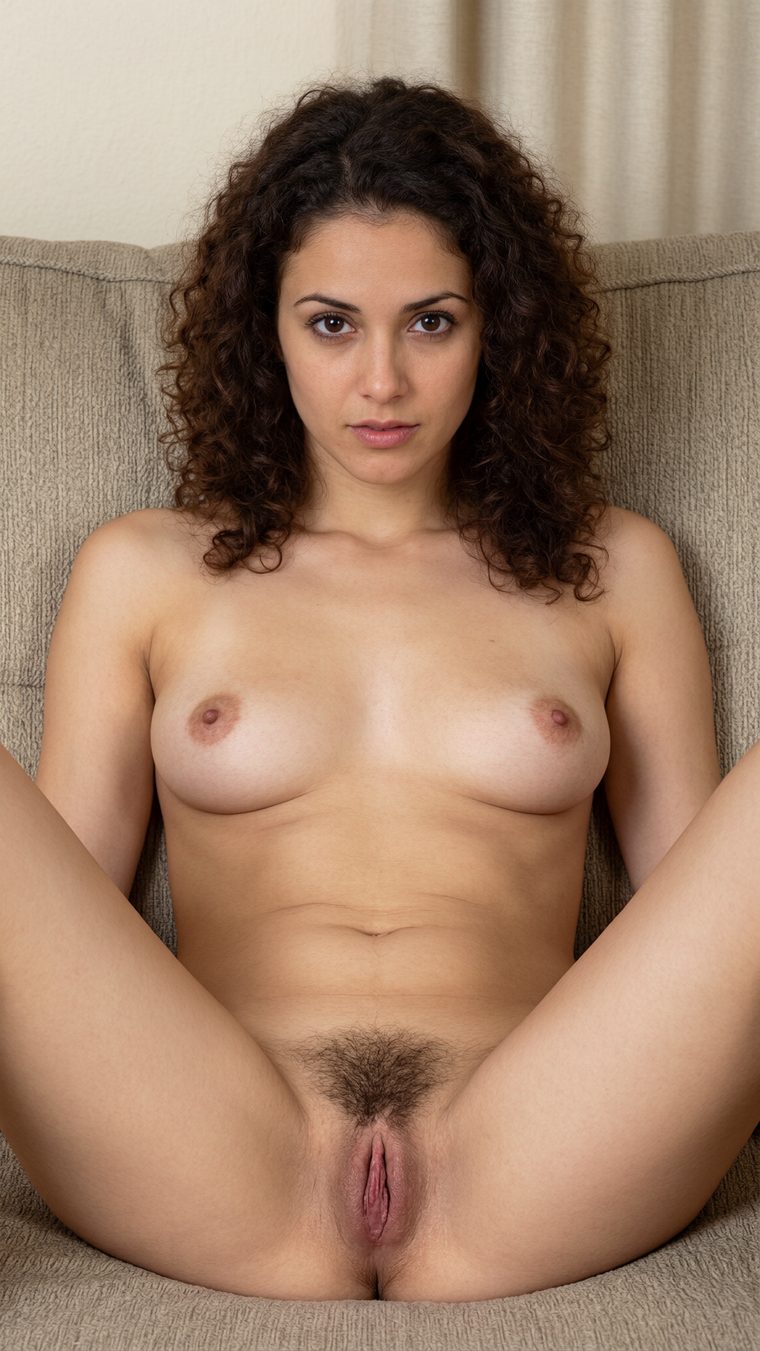
Derselbe Prompt, nur eine Einstellung geändert - Engine auf Vivid umgestellt - und sie lieferte genau das, was wir verlangt hatten: ein komplett explizites, wirklich fotorealistisches Bild mit sauberer Anatomie und überzeugender Haut und Haaren. Der Qualitätssprung war gewaltig, was den Realistic-Fehlschlag umso absurder macht: Das Modell kann es ganz offensichtlich. Die „Realistic“-Engine wollte nur einfach nicht.
Bild → Video: schnell und dreckig
Aus dem Standbild einen Clip zu machen, ist die zentrale Schleife des Studios. Genau dort macht sich das Tempo von „unter einer Minute“ wirklich bemerkbar.
Wir haben das Vivid-Bild über das „Use in“-Menü direkt in Image → Video geschoben, den Bewegungs-Prompt „she plays with her pussy and touching her breast,“ ergänzt, die Best-Engine auf 5 Sekunden und HD gestellt - veranschlagt: 13 Credits - und auf Generieren gedrückt. Der Render war nach etwa einer Minute in der Warteschlange zu sehen. Das ist für explizite Videos wirklich schnell, und dank Warteschlange kannst du gleich mehrere Jobs einreihen und laufen lassen.
720×1280 · „Best“-Engine
gerendert in ~1 Minute
Die Bewegung ist flüssig und die Anatomie bleibt über den Clip hinweg plausibel - klar im Bereich „gut genug, um wirklich nützlich zu sein“. Hollywood ist das nicht, und feine Details werden in Bewegung weicher, wie bei jedem Tool dieser Klasse. Aber für einen Render, der eine Minute dauert und nur ein paar Cent pro Sekunde kostet, liefert es mehr, als der Preis erwarten lässt.
Wenn die App dir einfach die Wahrheit sagt
Der Moment, der uns von SecretFlames Oberfläche überzeugt hat, war keine Funktion - es war eine Warnung.
Wir waren neugierig auf die günstige Fast-Engine und wählten sie aus. Statt uns still die Credits abzunehmen, stoppte uns die App mit der ehrlichsten UX-Ansage in diesem ganzen Test:
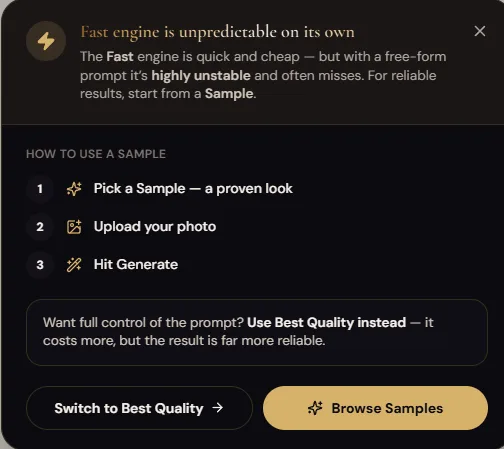
Lies das nochmal: Das Produkt sagt dir proaktiv, welche seiner eigenen Einstellungen dein Geld verschwenden, und bietet zwei Auswege an - starte mit einem erprobten Sample (Vorlage), oder wechsle auf Best für volle Kontrolle über den Prompt zu einem höheren Preis. Genau diese Orientierung musst du dir normalerweise erst holen, indem du Credits ausgibst. Also folgten wir dem Rat und nahmen eine Vorlage.
Der Vorlagen-Test
Das Sample, das wir ausprobiert haben, war, äh, nicht gerade schüchtern - eine Vorlage mit dem wörtlichen Titel „Gangbang Scene with 3 White Men.“ Wir legten unser früheres Bild als Quelle ein und generierten für 10 Credits 5 Sekunden:
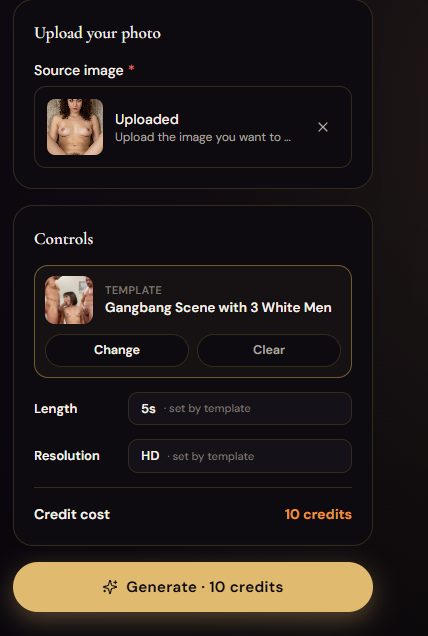
Der Clip war in weniger als einer Minute fertig und, ehrlich gesagt, hat das größtenteils funktioniert - saubere Bewegung, die richtige Szene, die richtige Anzahl an Beteiligten. Der einzige echte Makel war die Gesichtstreue: Das Gesicht der Frau driftete etwas vom Ausgangsbild weg. Unser Tester gab dem Ergebnis 4 von 5, und das passt - ein starkes Ergebnis mit einer klaren Schwäche.
Text → Video: von einem Satz zur Sexszene
Der letzte große Test kam komplett ohne Ausgangsbild aus: reines Text-zu-Video, und zwar am expliziten Ende der Skala.
Prompt: „Beautiful sexy blonde woman lying on bed with her legs spread. I approach her and fuck her vagina with my penis.“ Einstellungen: 10 Sekunden, HD, 26 Credits. Keine Vorlage, keine Quelle - nur ein Satz und eine explizite Anweisung. Das kam zurück:
720×1276 · nur Text
expliziter Akt, keine Vorlage
Das Ergebnis ist solide - ein zusammenhängender, expliziter 10-Sekunden-Clip, generiert nur aus einem Satz. Die Bewegung wirkt glaubwürdig, und der Clip zerfällt nicht in den verschmierten Matsch, den schwächere Tools bei uneingeschränktem Material produzieren. Die Einschätzung unseres Testers zur Technik dahinter: Es wirkt so, als würde ein Videomodell aus der Wan-Familie die Hauptarbeit machen.
Undress, Carousel und die Rückerstattung, die uns den Tag gerettet hat
Wir haben fast jedes verbleibende Tool ausprobiert. Das Muster: meistens funktionieren sie, und Fehlschläge kosten wenig. Über unsere Sessions gerechnet, lag die Gesamt-Trefferquote bei rund zwei Drittel Treffer, ein Drittel daneben - ein Verhältnis, das bei ein paar Cent bis ein paar Dollar pro Versuch völlig okay ist. Highlights:
✅ Undress - der klare Star. Fünf von fünf saubere, korrekte Generierungen, keine Artefakte. Das zuverlässigste Einzeltool, das wir hier getestet haben.
🎉 Carousel Studio - das Ein-Wort-Urteil unseres Testers war „Bombe“. Mehrere konsistente Perspektiven desselben Motivs, genau wie versprochen.
⚠️ Image Editor - die Schwachstelle. Gelegentlich wurden Körperteile hinzugefügt, nach denen niemand gefragt hatte. Stark, wenn es funktioniert; manchmal gruselig, wenn nicht.
💬 Kein Chat, kein Begleiter. Es gibt gar keine Gesprächsfunktion - das ist ein reines Kreativtool. Wenn du eine Freundin zum Reden suchst, bist du in einer anderen Kategorie (siehe Candy).
Die automatische Rückerstattung, die uns endgültig gekriegt hat
Eine Generierung ist komplett gescheitert - unser Ausgangsfoto war zu klein. Bei den meisten Tools würdest du jetzt ein Support-Ticket aufmachen. Bei SecretFlame kamen die Credits sofort automatisch zurück, kein Button zum Suchen, keine E-Mail zum Abschicken. Nachdem wir ein Tool getestet hatten, das 180 Tokens für fehlgeschlagene Videos kassiert und dich jede Rückerstattung manuell anfordern lässt, fühlte sich das fast radikal an. Es ist eine kleine Sache, die viel sagt: Das Kreativstudio ist darauf gebaut, dich bei Laune zu halten, nicht dich bei jeder Kleinigkeit abzukassieren.
Ein fehlgeschlagener Render war automatisch erstattet, noch bevor wir richtig genervt waren. Das ist der ganze Charakter dieses Produkts in einer einzigen Interaktion.
Was eine Generierung in Dollar wirklich kostet
SecretFlame verzichtet komplett auf Abos - du kaufst Credit-Packs und nutzt sie nach Bedarf, was wir heimlich ziemlich mögen (nichts zu kündigen, keine wiederkehrenden Kosten). Hier sind die Packs exakt so, wie sie im Bezahlvorgang angezeigt werden, Juli 2026:
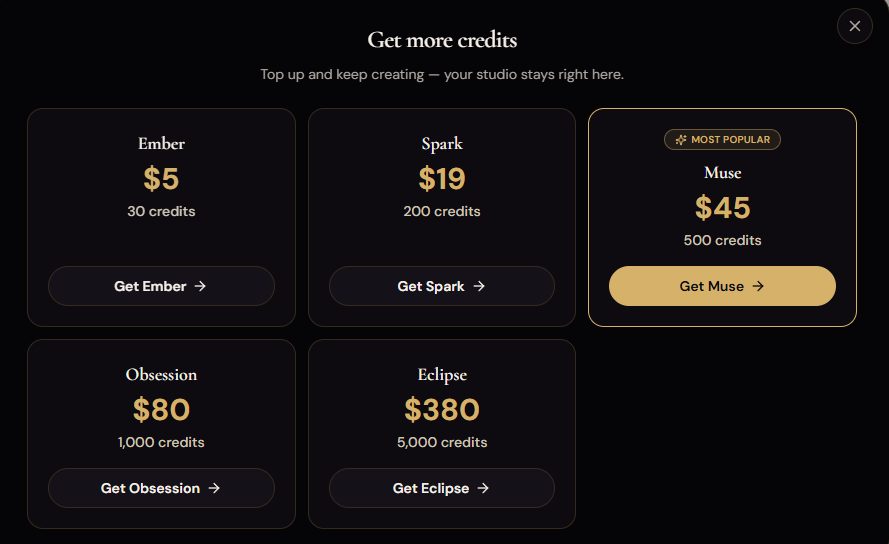
| Pack | Preis | Credits · effektiver Preis |
|---|---|---|
| Ember | $5 | 30 Credits · ≈ $0.167 / Credit (teuerste Kaufoption). |
| Spark | $19 | 200 Credits · ≈ $0.095 / Credit. |
| MuseBeliebt | $45 | 500 Credits · ≈ $0.090 / Credit. Der Tarif, den SecretFlame aktiv nach vorne schiebt - und ein solider Mittelweg. |
| Obsession | $80 | 1.000 Credits · ≈ $0.080 / Credit. |
| Eclipse | $380 | 5.000 Credits · ≈ $0.076 / Credit (bester Kurs, für Vielnutzer). |
Die Kosten pro Generierung in Dollar
Das ist der Teil, der zählt und den sonst niemand veröffentlicht. Also haben wir gerechnet. Die Kosten unten reichen vom günstigsten Paket (Eclipse) über das beliebteste Paket (Muse) bis zum teuersten kleinen Paket (Ember):
Die Credit-Kosten für Standbilder wurden in unserem Test nicht einzeln angezeigt. ~1–2 Credits sind unsere Schätzung - passend dazu, dass die 2 Gratis-Credits bei der Anmeldung für ein oder zwei Testbilder reichen. Die Videokosten sind die von der App genannten Credit-Beträge, umgerechnet nach dem jeweiligen Paketpreis. Längere Clips, Full HD und die Sound-Engine kosten mehr Credits als die hier gezeigten HD/Best-Basiswerte.
Ein expliziter 5-Sekunden-Clip kostet etwa einen Dollar. Ein uneingeschränkter 10-Sekunden-Clip per Text-zu-Video kostet etwa zwei. Das ist der günstigste echte Preis pro Video-Clip, den wir in dieser Kategorie gemessen haben.
Zum Vergleich: Bei Seduced AI kann ein Text-zu-Video-Clip bis zu ~$5 kosten, und in der Testphase kannst du die Funktion nicht einmal ausprobieren. Bei SecretFlame liegt ein vergleichbarer Clip im Höchstfall bei etwa $4.34 beim schlechtesten Paket und bei etwa $2.34 im beliebten Paket - und du kannst ihn ausprobieren, sobald du ein einziges kleines Paket gekauft hast. Der einzige echte Haken beim Preis-Leistungs-Verhältnis ist die Gratisstufe mit zwei Credits: Sie reicht kaum, um zu prüfen, ob die Seite überhaupt funktioniert, bevor du deine Karte zückst.
Die Scorecard
SecretFlame bewertet nach unserem 10-Punkte-Raster.
Die Vivid-Engine liefert exzellente, fotorealistische explizite Stills; die Undress-Ausgabe war makellos. Abzug gibt es für die Realistic-Engine, die einen expliziten Prompt ignoriert hat, und für einen Bildeditor, der manchmal zusätzliche Arme oder Beine dazuerfindet.
Bild-zu-Video und Text-zu-Video kommen beide mit uneingeschränkten Prompts klar, rendern in unter einer Minute und bleiben erstaunlich stabil. Gesichter können gegenüber dem Ausgangsbild leicht abdriften.
Engine (Fast/Best/Sound), Länge (5/10/15s), Auflösung (HD/Full HD), Eingaben für Ausgangsbild und letztes Frame, dazu Vorlagen. Genug Spielraum; nur die Vorlagenbibliothek dürfte größer sein.
Bei Bildern und Videos komplett unzensiert, mit eigenen Undress-, Face-Swap- und Duo-Tools. Eines der freizügigsten Studios, die wir getestet haben.
Wiederverwenden per „Use in“ mit einem Klick, unkomplizierte Nutzung aus der Library und Carousel Studio für Sets aus mehreren Blickwinkeln. Ein dauerhaftes Charaktersystem fehlt, und Gesichter aus der Vorlage können im Video abdriften.
Mit klarem Abstand die beste Bedienung in der Kategorie - aufgeräumtes Studio, fast alles per Klick und eine hervorragende mobile Seite. Sehr intuitiv, fast wie ein neues iPhone - und hier ist das nicht übertrieben.
Günstig pro Clip (ein 5s-Video ≈ $1), kein Abo, klarer Bezahlvorgang per Karte und automatische Rückerstattungen. Einziger echter Kritikpunkt: mickrige zwei Gratis-Credits.
Zwei Gratis-Credits sind knauserig - kaum mehr als ein Testschuss. Dafür machen die Hinweise direkt im Tool, etwa die Fast-Engine-Warnung und die Samples, den Einstieg billig und schnell.
Sieben Bonus-Tools, die größtenteils liefern: Undress (5/5), Carousel („Bombe“), Face Swapper, AI Photoshoot, Duo/Collab und Video Restyle.
Vertrauenswürdiger Bezahlvorgang mit automatischen Rückerstattungen und harter Altersschranke. Aber Undress und Face-Swap bei Uploads schaffen echtes Deepfake-Missbrauchspotenzial - und die Verantwortung, es nicht auszunutzen, liegt beim Nutzer.
Matrix der Adult-Content-Fähigkeiten
Was SecretFlame macht - und was nicht.
| Explizite / uneingeschränkte Bilder | ✔ Ja (nutz Vivid) |
| Realistische Nacktheit & fotorealistische Bilder | ✔ Ja |
| Bild-zu-Video (explizit) | ✔ Ja |
| Text-zu-Video (uneingeschränkte Szenen) | ✔ Ja |
| Undress / „Nudify“ eines hochgeladenen Fotos | ✔ Ja (auch Male Mode) |
| Face-Swap in ein Foto | ✔ Ja |
| Szenen mit zwei Personen / Gruppe | ✔ Ja (Duo + Vorlagen) |
| Audio / Ton im Video | ◑ Ja - „Sound“-Engine (ungetestet) |
| Abbild realer Personen ohne Einwilligung | ✗ Lass es - missbräuchlich & oft illegal |
| Kostenlose Generierungen | ◑ Nur 2 Credits bei Anmeldung |
Pro & Contra
Was uns gefiel
- Die einfachste, sauberste Oberfläche der Kategorie - plus starke mobile Seite
- Komplett unzensiert - bei Bildern und Videos
- Schnell: explizite Clips rendern in etwa einer Minute
- Günstig pro Clip - ein 5-Sekunden-Video kostet ungefähr einen Dollar
- Kein Abo - einfache Credit-Pakete zum Aufladen
- Schlichte Kartenzahlung mit automatischen Rückerstattungen bei fehlgeschlagenen Generierungen
- Sieben Bonus-Tools, die größtenteils liefern (Undress war 5/5, Carousel ein Highlight)
- Hilfreiche Hinweise direkt im Kontext, statt dass Credits still draufgehen
Was uns enttäuschte
- Nur 2 Gratis-Credits - du zahlst fast sofort
- Die „Realistic“-Engine ignorierte einen expliziten Prompt (nutz Vivid)
- Der Image Editor fügt gelegentlich ungefragte Körperteile hinzu
- Keine Chat- oder Companion-Ebene, gar nichts
- Die Vorlagenbibliothek ist gut, könnte aber größer sein
- Undress und Face-swap bei Uploads machen Deepfake-Missbrauch mit echten Personen möglich
Für wen es ist - und unser finales Urteil
✅ Nimm SecretFlame, wenn du…
- Willst du den denkbar einfachsten Weg, um unzensierte Bilder und Videos zu generieren
- Legst du Wert auf Tempo und hasst Warten - die meisten Renderings sind in unter einer Minute fertig
- Willst du Abrechnung nach Verbrauchohne Abo und günstige Videos pro Clip
- Legst du Wert auf einen seriösen Bezahlvorgang - normale Kreditkarte, automatische Rückerstattung bei fehlgeschlagenen Jobs
- Willst du eine komplette Toolbox - Undress, Face-swap, Carousel, Duo, Photoshoot - an einem Ort
❌ Schau dich woanders um, wenn du…
- Willst du eine KI-Freundin zum Chatten - hier gibt es keine Chat-Ebene (dafür ist Candy AI)
- Brauchst du echte Charakterkonsistenz über ein ganzes Set hinweg (Mage ist da stärker)
- Willst du einen großzügigen Gratis-Tarif zum Ausprobieren - zwei Credits reichen kaum zum Reinschnuppern
- Willst du aus Prinzip kein Tool mit undress/face-swap-Funktionen anfassen
SecretFlame holt sich unseren Spitzenplatz nicht, weil es das extremste oder leistungsstärkste Tool ist, sondern weil es das erste unzensierte Studio ist, das wirklich angenehm zu bedienen ist. Es ist schnell, komplett explizit, pro Clip günstig, akzeptiert normale Kreditkarten und erstattet fehlgeschlagene Jobs automatisch - und das alles in einer Oberfläche, mit der auch komplette Anfänger beim ersten Versuch klarkommen. Der Gratis-Tarif mit zwei Credits ist knauserig und die Realistic-Engine hat einen Bug, aber das sind Randnotizen bei einem Produkt, das mehr als alles andere, was wir getestet haben, einfach funktioniert. Wenn du unzensierte Bilder und Videos machen willst, fang hier an.