
SecretFlame Review (2026): The Uncensored Studio That Took Our #1 Spot
We paid our way into secretflame.ai, ran explicit prompts through every engine, timed the renders, priced each generation to the cent, and tried all seven bonus tools. The result is the easiest adult AI studio we’ve ever used - and the first genuinely uncensored one good enough to edge out Mage at the top of our rankings. It isn’t flawless. It’s just very, very hard to stop using.
The best all-round uncensored generator we’ve tested: a clean, iPhone-simple studio that makes unrestricted adult images and video in under a minute, throws in undress, face-swap, carousel and duo tools, and refunds failures without being asked. Stingy with free credits and the “Realistic” engine has a bug - but nothing else here comes this close to “just works.”
SecretFlame at a glance
If you only read one box, read this one.
TL;DR - is SecretFlame worth it?
Yes - and it’s our new #1. SecretFlame does the thing every other tool in this category struggles with: it gets out of your way. The studio is spotless, everything is one click from everything else, generations are trivially reusable, and the mobile site is genuinely good. Under that friendly surface it’s completely uncensored - explicit stills, image-to-video, text-to-video, plus undress, face-swap, carousel and duo tools - and the renders come back fast, usually in under a minute.
It isn’t perfect. The free tier is a miserly two credits, so you’re paying almost immediately. The “Realistic” image engine ignored a fully explicit prompt and handed us a woman in a sweater (the “Vivid” engine then nailed the exact same prompt). The image editor occasionally grows a spare limb, and there’s no chat or companion layer at all. But the hit rate across all the tools was roughly two-thirds good, the misses are cheap to redo, and when a job genuinely failed the credits came back automatically. That combination - permissive, fast, cheap-per-clip and effortless - is one nobody else here has managed.
Where SecretFlame sits in the market (and why it’s our new #1)
SecretFlame is the all-rounder that finally got the basics right. It’s the top overall score on NSFW Arena, but it’s worth being precise about why. Mage is still the widest creative toolkit and the character-consistency champion - but it stops at erotica and won’t go fully unrestricted. SecretFlame will, without losing the friendliness, which is exactly why it edges ahead for this site’s audience.
Against the dedicated adult generators the gap is bigger. Where Seduced AI hides video behind a paywall and a clunky builder, SecretFlame lets you animate on demand for a fraction of the price. Where SoulGen makes you pay through a crypto-and-gift-card checkout, SecretFlame takes an ordinary card and refunds failures on its own. And where Nastia AI upsells you mid-tease and can’t keep a face consistent, SecretFlame just renders the thing you asked for. Only Candy AI beats it on one narrow axis - a persistent, chatting companion - which SecretFlame doesn’t try to be.
How we score adult generators
Every tool on NSFW Arena is graded on the same 10-point framework, weighted for what the category is actually for.
1. Image generation quality - realism, coherence, artifact rate.
2. Video generation - availability, quality, and whether you can actually use it.
3. Customization & control - engines, length, resolution, templates, source images.
4. Content freedom - how far the NSFW range actually stretches.
5. Character reuse & consistency - reusing a face or generation across shots.
6. Interface & ease of use - onboarding, clarity, friction, mobile.
7. Pricing & value - the true cost of real use, in dollars.
8. Trial & onboarding - can you evaluate it before you pay?
9. Extras & toolbox - undress, face-swap, carousel, duo, photoshoot.
10. Privacy & safety - checkout, refunds, age-gating, real-person policy.
Minute zero: the cleanest studio in the category
First impression, unfiltered: everything is simple and obvious. If you’ve never touched an AI generator, here’s the whole idea - you type a description, pick a “style engine,” hit generate, and a picture or clip appears in a queue on the right. SecretFlame is about as friendly a version of that as exists. It calls itself a studio, and it earns the word.
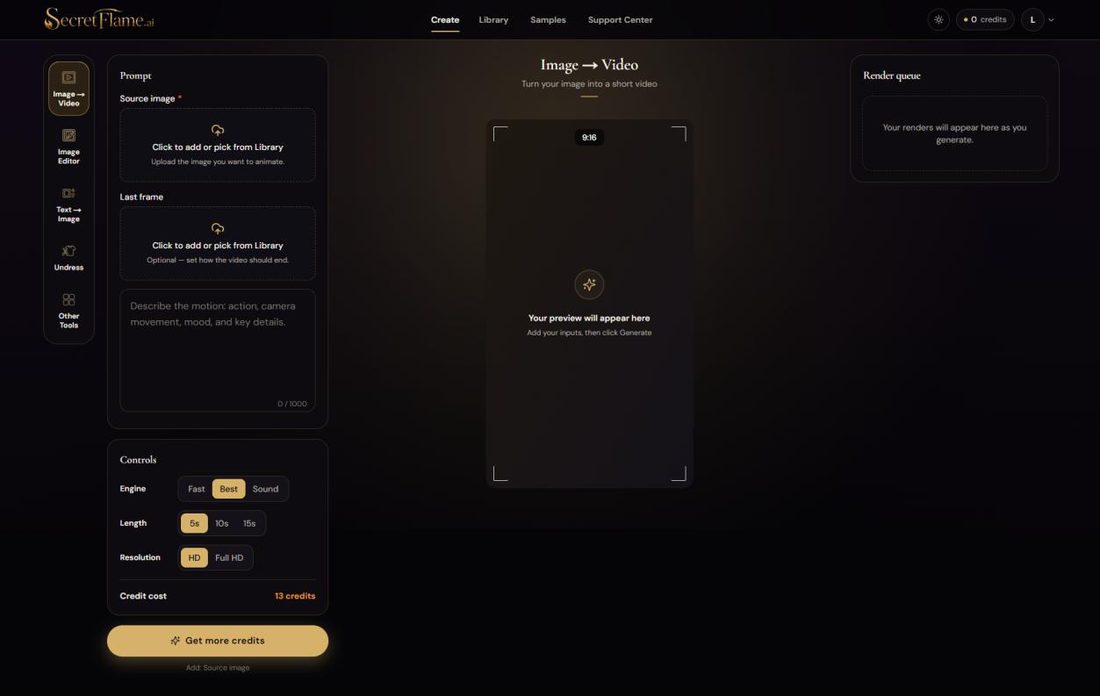
Here’s what lives where, because it takes about ten seconds to learn:
Left sidebar - the tools: Image → Video, Image Editor, Text → Image, Undress, and an Other Tools drawer with seven more.
Middle column - your prompt, a Source image slot (click to upload or pick from your Library), an optional Last frame, and a live preview.
Bottom-left controls - Engine (Fast / Best / Sound), Length (5s / 10s / 15s), Resolution (HD / Full HD), and a running Credit cost that updates as you change them.
Right rail - the Render queue, where finished generations stack up and can be reused, re-run or pushed straight into another tool in one click.
The one-click reuse is the part that quietly makes it feel expensive-in-a-good-way: any finished image has a “Use in” menu that fires it straight into Image → Video, the Image Editor or AI Photoshoot, and already uploaded material is just as easy to reuse. No re-uploading, no hunting for files. Our tester’s verdict on the UI was blunt: it’s “as understandable as a new iPhone,” and the mobile version is just as good - a sentence we have not been able to write about anything else in this category.
The seven-tool “Other Tools” drawer
Beyond the four headline modes, the Other Tools drawer is where SecretFlame’s ambitions show. It’s not a one-trick text-to-image site; it’s trying to be the whole studio. Here’s the full set, verbatim from the app:
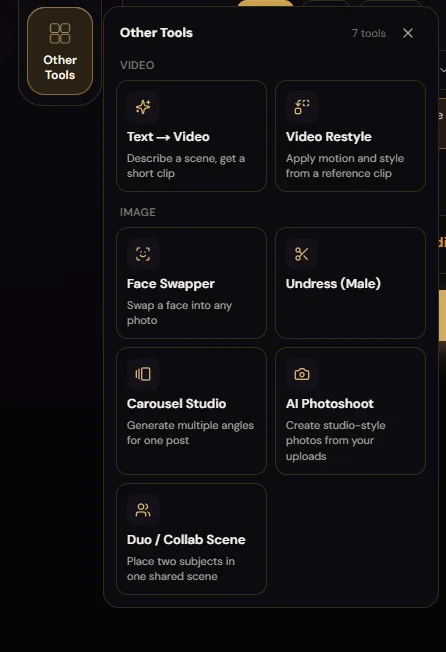
Text → Video - describe a scene, get a short clip (no source image needed).
Video Restyle - apply motion and style from a reference clip.
Face Swapper - swap a face into any photo.
Undress - remove clothing from an uploaded photo (with a male mode too).
Carousel Studio - generate multiple angles of one subject for a single post.
AI Photoshoot - create studio-style photos from your uploads.
Duo / Collab Scene - place two subjects in one shared scene.
“Realistic” lies, “Vivid” delivers
Our first real test was a fully explicit text-to-image prompt. It surfaced both the best and the most annoying thing about SecretFlame in the space of two clicks.
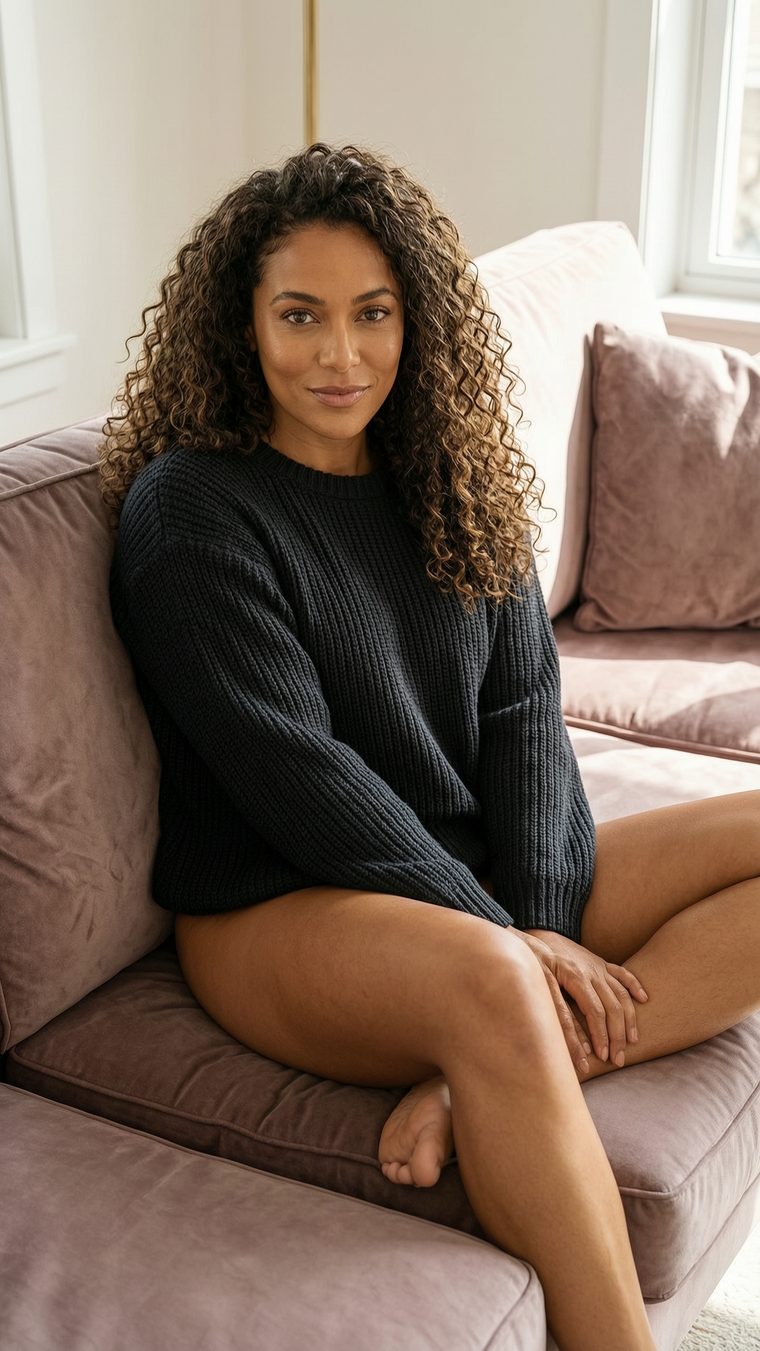
The prompt, unedited: “amazing sexy brunette with curly hair, 24 years old, brown eyes, completely naked, on the sofa, legs spread, showing her pussy.” We picked the engine that sounds like the safe default - Realistic - and got back a perfectly nice photo of a woman wearing a sweater. It quietly dropped the entire explicit half of the prompt.
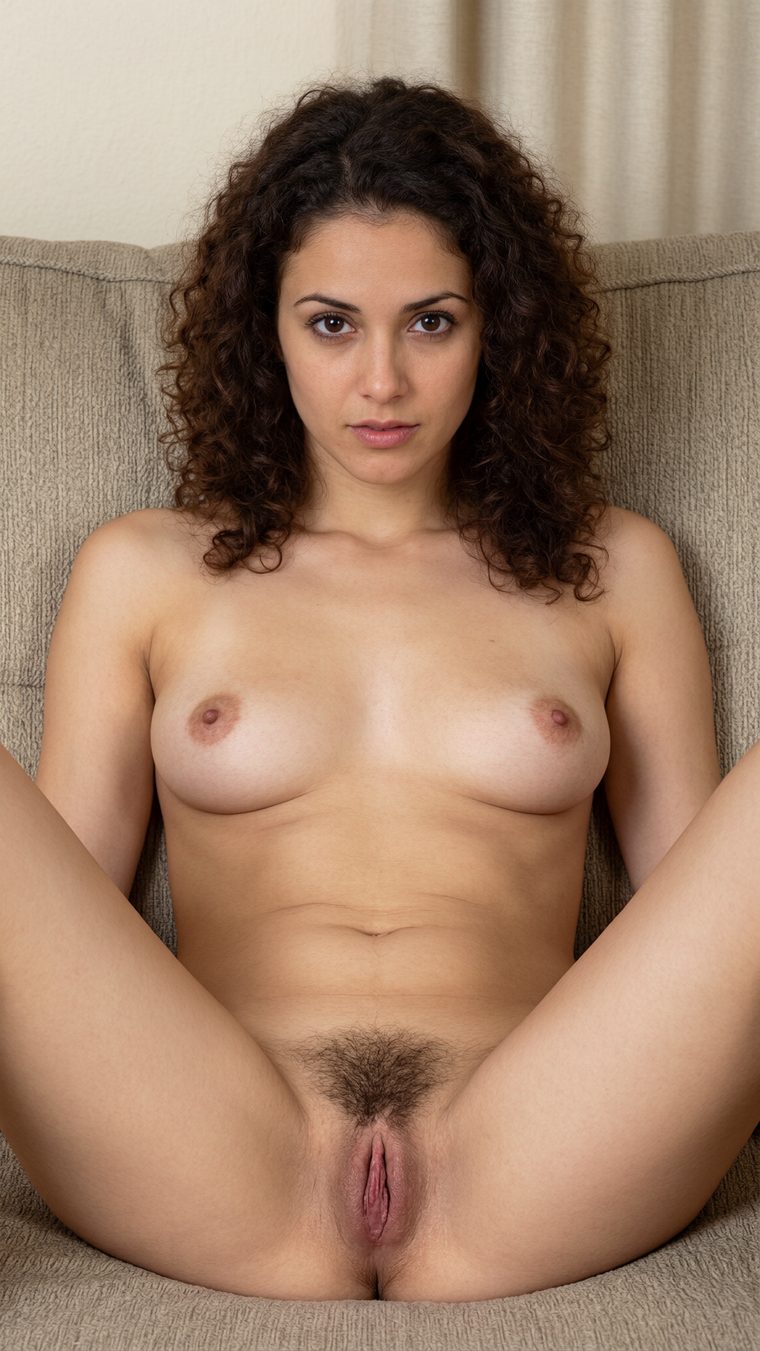
Same prompt, one setting changed - engine swapped to Vivid - and it delivered exactly what we asked for: a fully explicit, genuinely photorealistic image with clean anatomy and convincing skin and hair. The quality jump was night and day, which makes the Realistic miss all the more baffling: the model can clearly do it, the “Realistic” engine just… declined.
Image → Video: fast and filthy
Turning that still into a clip is the studio’s core loop, and it’s where the “under a minute” speed really lands.
We pushed the Vivid image straight into Image → Video with the “Use in” menu, added the motion prompt “she plays with her pussy and touching her breast,” picked the Best engine at 5 seconds and HD - a quoted 13 credits - and hit generate. The render appeared in the queue in about a minute. That’s genuinely fast for explicit video, and the queue means you can line up several and let them cook.
720×1280 · “Best” engine
rendered in ~1 minute
Motion is smooth and the anatomy holds together across the clip - well within “good enough to be genuinely useful.” It isn’t Hollywood, and fine detail softens in motion the way it does on every tool in this class, but for a one-minute, few-cents-per-second render it punches above its price.
When the app just tells you the truth
The moment that sold us on SecretFlame’s interface wasn’t a feature - it was a warning.
Curious about the cheap-and-cheerful Fast engine, we selected it - and instead of silently taking our credits, the app stopped us with the single most honest piece of UX in this entire review:
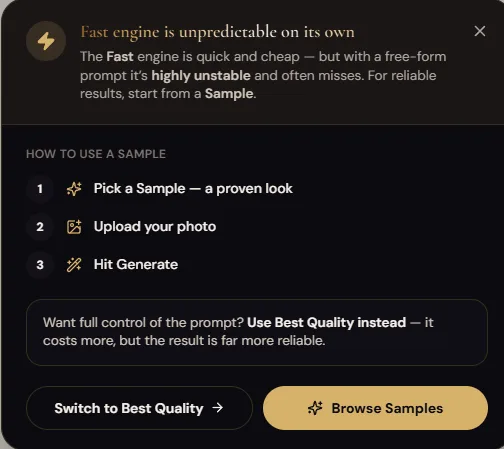
Read that again: the product is proactively telling you which of its own settings will waste your money, and offering two fixes - start from a proven Sample (template), or switch to Best for full prompt control at a higher price. That’s the kind of guidance you normally have to learn by burning credits. So we took its advice and picked a template.
The template test
The Sample we tried was, uh, not shy - a template literally titled “Gangbang Scene with 3 White Men.” We dropped our earlier image in as the source and generated for 10 credits at 5 seconds:
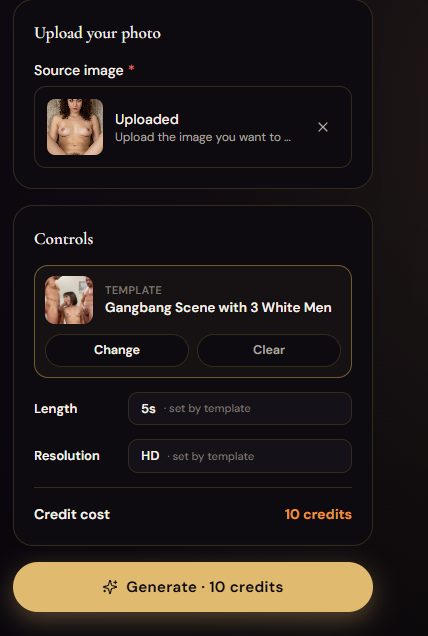
It rendered in under a minute and, honestly, it mostly worked - coherent motion, the right scene, the right number of participants. The only real flaw was face fidelity: the woman’s face drifted a little from the source. Our tester scored this one 4 out of 5, and that feels right - a strong result with one soft edge.
Text → Video: from a sentence to a sex scene
The last big test skipped the source image entirely: pure text-to-video, at the explicit end of the scale.
Prompt: “Beautiful sexy blonde woman lying on bed with her legs spread. I approach her and fuck her vagina with my penis.” Settings: 10 seconds, HD, 26 credits. No template, no source - just a sentence and an explicit instruction. Here’s what came back:
720×1276 · text-only
explicit act, no template
The result is solid - a coherent, explicit 10-second clip generated from nothing but a sentence. Movement is believable and it doesn’t dissolve into the smeary mess that lesser tools produce at the explicit end. Our tester’s hunch on the tech underneath: it feels like a Wan-family video model doing the heavy lifting.
Undress, carousel, and the refund that made our day
We ran nearly every remaining tool. The pattern: they mostly work, and the failures are cheap. Tallying our sessions, the overall hit rate landed around two-thirds good to one-third off - a ratio that, at a few cents to a couple of dollars per attempt, is very livable. Highlights:
✅ Undress - the standout. Five for five clean, correct generations, no artifacts. The most reliable single tool we touched here.
🎉 Carousel Studio - our tester’s one-word review was “bomb.” Multiple consistent angles of one subject, exactly as advertised.
⚠️ Image Editor - the weak link. It occasionally added body parts it wasn’t asked for. Great when it behaves, occasionally uncanny when it doesn’t.
💬 No chat, no companion. There’s no conversational layer at all - this is a pure creation tool. If you want a girlfriend to talk to, that’s a different category (see Candy).
The auto-refund that quietly won us over
One generation failed outright - our source photo was too small. On most tools this is where you start a support ticket. On SecretFlame, the credits came back automatically and instantly, no button to hunt for, no email to send. After reviewing a tool that charges 180 tokens for failed videos and makes you claim each refund by hand, this felt almost radical. It’s a small thing that signals a big thing: the studio is built to keep you happy, not to nickel-and-dime you.
A failed render refunded itself before we’d even finished being annoyed. That’s the whole personality of this product in one interaction.
What a generation really costs, in dollars
SecretFlame skips subscriptions entirely - you buy credit packs and spend them as you go, which we quietly love (nothing to cancel, nothing recurring). Here are the packs exactly as shown at checkout, July 2026:
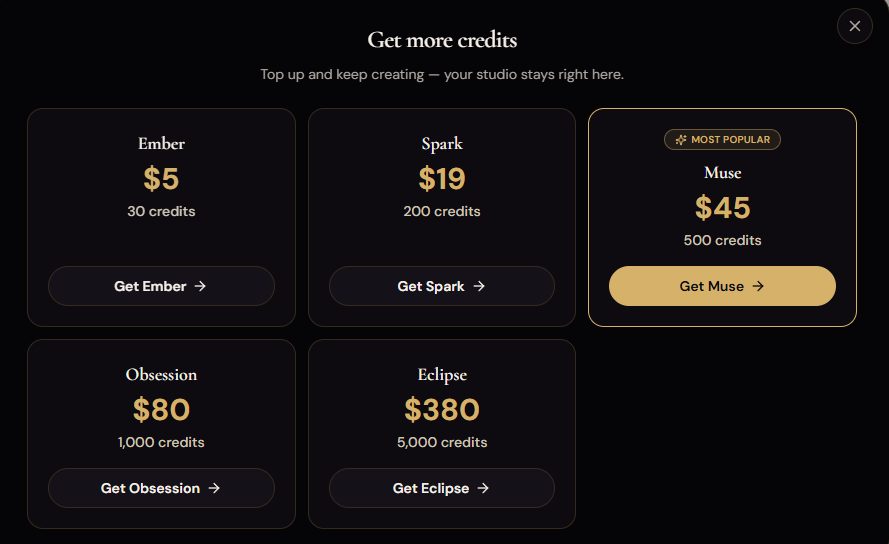
| Pack | Price | Credits · effective rate |
|---|---|---|
| Ember | $5 | 30 credits · ≈ $0.167 / credit (the most expensive way to buy). |
| Spark | $19 | 200 credits · ≈ $0.095 / credit. |
| MusePopular | $45 | 500 credits · ≈ $0.090 / credit. The tier SecretFlame pushes, and a fair middle. |
| Obsession | $80 | 1,000 credits · ≈ $0.080 / credit. |
| Eclipse | $380 | 5,000 credits · ≈ $0.076 / credit (best rate, for heavy users). |
The dollar spread per generation
This is the part that matters and that nobody else publishes, so we did the math. Costs below run from the cheapest pack (Eclipse) to the most popular (Muse) to the priciest small pack (Ember):
Still-image credit cost wasn’t itemized on-screen during our test; ~1-2 credits is our estimate, consistent with the 2 free signup credits covering a test shot or two. Video costs are the app’s quoted credit amounts converted at each pack’s rate. Longer clips, Full HD and the Sound engine cost more credits than the HD/Best baselines shown here.
A 5-second explicit clip costs about a dollar. A 10-second unrestricted text-to-video costs about two. That’s the cheapest real per-clip video pricing we’ve measured in this category.
For context: on Seduced AI a text-to-video clip can run up to ~$5 and you can’t even test it on the trial. SecretFlame’s equivalent tops out around $4.34 on the worst pack and about $2.34 on the popular one - and you can try it the moment you’ve bought a single small pack. The only genuine value knock is the two-credit free tier: it’s barely enough to confirm the site works before you reach for your card.
The scorecard
SecretFlame graded against our 10-point rubric.
The Vivid engine produces excellent, photoreal explicit stills; undress output was flawless. Marked down for the Realistic engine ignoring an explicit prompt and an image editor that sometimes adds limbs.
Both image-to-video and text-to-video handle unrestricted prompts, render in under a minute, and hold together well. Faces can drift slightly from a source image.
Engine (Fast/Best/Sound), length (5/10/15s), resolution (HD/Full HD), source and last-frame inputs, plus templates. Deep enough; the template library could be larger.
Fully uncensored across image and video, with dedicated undress, face-swap and duo tools. Among the most permissive studios we’ve tested.
One-click “Use in” reuse, easy Library re-use, and Carousel Studio for multi-angle sets. No persistent-character system, and source faces can drift in video.
The best in the category by a clear margin - clean studio, one-click everything, and an excellent mobile site. “Like a new iPhone,” and it means it.
Cheap per clip (a 5s video ≈ $1), no subscription, plain card checkout and automatic refunds. Only real knock: a miserly two free credits.
Two free credits is stingy - barely a test shot - but in-context guidance (the Fast-engine warning, Samples) makes learning cheap and fast.
Seven bonus tools that mostly deliver: Undress (5/5), Carousel (“bomb”), Face Swapper, AI Photoshoot, Duo/Collab and Video Restyle.
Trustworthy checkout and auto-refunds, hard age gating. But undress/face-swap on uploads create real deepfake-abuse potential that rests on the user to avoid.
Adult content capability matrix
Exactly what SecretFlame will and won’t do.
| Explicit / unrestricted still images | ✔ Yes (use Vivid) |
| Realistic nudity & photoreal stills | ✔ Yes |
| Image-to-video (explicit) | ✔ Yes |
| Text-to-video (unrestricted acts) | ✔ Yes |
| Undress / “nudify” an uploaded photo | ✔ Yes (male mode too) |
| Face swap into a photo | ✔ Yes |
| Two-person / group scenes | ✔ Yes (Duo + templates) |
| Audio / sound on video | ◑ Yes - “Sound” engine (untested) |
| Real-person likeness of non-consenting people | ✗ Don’t - abusive & often illegal |
| Free generations | ◑ Just 2 credits on signup |
Pros & cons
What we loved
- The easiest, cleanest interface in the category - and a great mobile site
- Fully uncensored across both image and video
- Fast: explicit clips render in about a minute
- Cheap per clip - a 5-second video costs roughly a dollar
- No subscription - simple pay-as-you-go credit packs
- Plain card checkout with automatic refunds on failed jobs
- Seven bonus tools that mostly deliver (Undress was 5/5, Carousel a standout)
- Helpful in-context guidance instead of silent credit-burning
What let us down
- Only 2 free credits - you pay almost immediately
- The “Realistic” engine ignored an explicit prompt (use Vivid)
- Image Editor occasionally adds unrequested body parts
- No chat or companion layer at all
- Template library is good but could be bigger
- Undress + face-swap on uploads enable real-person deepfake misuse
Who it’s for - and the final verdict
✅ Get SecretFlame if you…
- Want the easiest possible way to generate uncensored images and video
- Care about speed and hate waiting - most renders land in under a minute
- Want pay-as-you-go pricing with no subscription and cheap per-clip video
- Value a trustworthy checkout - a normal card, with auto-refunds when jobs fail
- Want a full toolbox - undress, face-swap, carousel, duo, photoshoot - in one place
❌ Look elsewhere if you…
SecretFlame wins our top spot not by being the most extreme or the most powerful, but by being the first uncensored studio that’s genuinely pleasant to use. It’s fast, it’s fully explicit, it’s cheap per clip, it takes a normal card and refunds its own mistakes - and it does all of that behind an interface a complete beginner can drive on the first try. The two-credit free tier is stingy and the Realistic engine has a bug, but those are footnotes on a product that, more than anything else we’ve tested, simply works. If you want to make uncensored images and video, start here.