
ZenCreator Review (2026): The Most Powerful Uncensored Studio - and the Least Forgiving
We bought our way into zencreator.pro, ran the same explicit prompt through engine after engine, timed the misses, priced every generation to the cent, and pushed our stills into video. The verdict: this is the most feature-dense uncensored studio we’ve tested - a wall of named engines, hundreds of templates and a rare bit of honesty about what’s under the hood. It’s also the one most likely to leave a casual user lost. It’s a professional’s tool wearing a consumer app’s clothes.
The widest bank of uncensored image and video engines in one place, wrapped around a genuinely transparent engine picker and cheap per-clip pricing - but gated behind a $20 cover charge with zero free credits, and a learning curve that punishes anyone who just wants a quick result. Brilliant for power users; bewildering for everyone else.
ZenCreator at a glance
If you only read one box, read this one.
TL;DR - is ZenCreator worth it?
Yes, if you’re the right person for it - and that person is a creator, not a tourist. ZenCreator throws more raw capability at you than anything else in this roundup: fifteen-plus named engines for stills and video, hundreds of engine-tagged templates, body-shape LoRAs, undress and face-swap tools, video-to-video, lipsync, an API and even an MCP server. And it does something we keep asking these tools to do and rarely see - it tells you what each engine is for, right down to a per-engine uncensored badge and credit price.
But it makes you work. There’s no free tier at all - you’re paying $19.99 before you generate a single pixel - and the output is genuinely hit-or-miss. We ran one explicit prompt through five engines and got five different kinds of wrong before the sixth nailed it. That’s not a dealbreaker (you can fire off ten images at once and swap engines for pennies), but it means the studio rewards patience and punishes the impatient. Our tester’s blunt summary: it “looks like a tool for professionals, not for someone who came to have fun.” Lean on the templates and ready-made prompts and your hit rate climbs sharply.
Where ZenCreator sits in the market
Every generator in this category makes a trade between power and ease. ZenCreator plants its flag firmly on the power side. It lands at #5 of 7 on NSFW Arena not because the output is weak - at its best it rivals anyone’s - but because getting to that best takes real effort.
The most useful comparison is SecretFlame, our current #1. Both are uncensored image-and-video studios at similar per-clip prices, but they’re philosophical opposites: SecretFlame hides the complexity and coaches you toward a good result; ZenCreator exposes the complexity and hands you the controls. If you want the easiest path to explicit content, SecretFlame wins. If you want the most levers to pull, ZenCreator does.
Against the dedicated adult generators it’s a genuine step up on transparency and value. Where Seduced AI also paywalls the front door and buries video behind a clunky builder at up to $5 a clip, ZenCreator’s clips run closer to a dollar and it tells you exactly which engine you’re using. Where SoulGen makes you pay through a crypto-and-gift-card checkout, ZenCreator takes a normal card and lets credits roll over forever. And where Mage is the friendliest creative toolkit but stops at erotica, ZenCreator goes fully unrestricted. Only Candy AI plays a different game entirely - a chatting companion, which ZenCreator doesn’t try to be.
How we score adult generators
Every tool on NSFW Arena is graded on the same 10-point framework, weighted for what the category is actually for.
1. Image generation quality - realism, coherence, artifact rate.
2. Video generation - availability, quality, and whether you can actually use it.
3. Customization & control - engines, length, resolution, templates, source images, LoRAs.
4. Content freedom - how far the NSFW range actually stretches.
5. Character reuse & consistency - reusing a face or generation across shots.
6. Interface & ease of use - onboarding, clarity, friction, mobile.
7. Pricing & value - the true cost of real use, in dollars.
8. Trial & onboarding - can you evaluate it before you pay?
9. Extras & toolbox - undress, face-swap, photoshoot, video tools, API.
10. Privacy & safety - checkout, refunds, age-gating, real-person policy.
Minute zero: a paywall, then a very deep studio
ZenCreator doesn’t pretend to be a free trial. The moment you sign in it makes the deal plain: you have zero credits, and nothing happens until you buy some. That’s the first thing to know and the biggest knock against it - there’s no “generate one and see” here. Checkout, at least, is painless: a normal card payment (with a backup card option and crypto), and the packs are all one-time with credits that never expire. We paid, and we were in.
What greets you is a studio, in the fullest sense - and this is where new users start to sweat. The left rail alone is a wall of tools, split into Video Generation and Image Generation:
- Image-To-Video
- Text-To-Video
- Video-To-Video
- Video Upscaler
- Lipsync
- AI Video Merger
- Text-To-Image · Image-To-Image
- Editor & Combiner
- Head & Face Swap
- Upscaler · Variations · Collabs
- PhotoShoot · Face Generator
- Female Undresser · Male Undresser
And that’s before you notice the API, the MCP server (in beta), an “AI University” learning hub and a Publishing tool for pushing finished content out. It’s a serious pitch at the AI-influencer crowd - the credit packs are literally named Starter, Creator, Influencer and Professional. Powerful? Hugely. Obvious? Not even slightly. As our tester put it, the interface is fine, “but a regular user will have to sit with it for a while to work it out.”
The honest engine picker: no guessing what’s under the hood
Most tools hide which model they run. ZenCreator does the opposite - and it’s the single thing we most wish everyone else would copy.
Open Text-to-Image and you don’t get a mystery “generate” button - you get a menu of named engines, each with a one-line description of what it’s good at, its maximum resolution, its credit price, and - crucially - a badge telling you whether it’s uncensored or filtered. No black box, no guessing. Here’s the full still-image roster we saw, verbatim, so you can read it as text rather than squint at a screenshot:
| Image engine | Cost | What it’s best for · content filter |
|---|---|---|
| GeneralBest quality | 1 cr | Character series - the same face across many photos. Up to 4K · Uncensored. |
| Flux Klein SpicyOur winner | 2 cr | Nude photos that look real - the engine that finally rendered our explicit prompt correctly. Up to 2MP · Uncensored. |
| Qwen Image ProPro | 2 cr | Sharp, detailed nudes - “worth the extra time.” 2K · Uncensored. |
| WAN 2.7 ProPro | 2 cr | Photo-real 4K nudes, sharpest faces and bodies. 2K · Uncensored. |
| WAN 2.7 Image | 1 cr | Best when you describe a specific pose or detailed scene. 1K · Uncensored. |
| Seedream 5 | 1 cr | Cinematic, magazine-style shots in rich colour. 2K · Uncensored. |
| Qwen Image | 1 cr | Fast and cheap - best for testing prompt ideas. 2K · Uncensored. |
| SDXLLoRAs | 1 cr | Stack body LoRAs to tune shape, curves and proportions. 1K · Uncensored. |
| Nano Banana 2Censored | 2 cr | Realistic photos ready to animate - clothed or lingerie only. 2K · Filters ON. |
Notice the pattern: eight of the nine are uncensored, and the one that isn’t (Nano Banana 2) says so plainly. The video side is just as transparent. Open Image-to-Video and the engines are grouped by how heavily they’re filtered:
Minimal filters (NSFW): Wan 2.2 Spicy (start/end-frame control), Seedance Pro (best price-to-quality), and Wan 2.5 / 2.6 / 2.7 Spicy variants - several with AI audio and up to 15-second clips.
Partial filters: Grok - “dynamic animations from xAI.”
Filters ON (SFW): the Kling family (2.1 / 2.5 / 2.6 + Audio) - high quality, but clearly flagged as safety-filtered.
The template library is the secret to not wasting money
If the engine picker is ZenCreator’s best idea, the template library is its best safety net. Every tool has one, stuffed with hundreds of ready-made looks - and, keeping with the theme, each template shows you which engine it runs on before you commit. You can filter them by exactly the axes you’d expect on an adult tool (Male / Female / Straight / Gay / Lesbian, plus content tags), and an adult-template filter gates the explicit ones.
This turns out to be the single most useful feature for a newcomer. Free-form prompting on ZenCreator is a coin-flip until you learn the engines; a template is a known-good recipe. Our overall conclusion after running a stack of generations was blunt and practical: the reliable path is to start from the templates and ready-made prompts. It’s the setting that most raises the odds you get what you actually wanted.
The templates aren’t a gimmick - on a tool this hit-or-miss, they’re the difference between spending credits and wasting them.
The hunt for the right engine (a real, unedited test)
We wanted to see the studio at its rawest, so we skipped the templates and prompted from scratch. What followed was a tour of everything that can go wrong before something goes right.
The prompt, lightly cleaned up from our tester’s notes: “23-year-old woman with straight brown hair, green eyes, ponytails, kneeling and performing oral sex.” We ran it, unchanged, through one engine after another. Here’s the log:
General - the eyes came out radioactively green, and the anatomy was off: a limb where a limb shouldn’t be. A second pass looked better, but the explicit detail still didn’t read as real. A miss.
WAN 2.7 Pro - our tester’s entire written reaction was: “…what is that?” A miss.
Seedream - suddenly rendered an East-Asian woman (it’s a Chinese model, so, fair enough) - but she was just standing there, ignoring the action in the prompt. A miss.
WAN 2.7 Image - same prompt, different flavour of wrong. A miss.
Flux Klein Spicy - 🎉 finally. The correct hair, the correct eyes, the correct act, rendered convincingly. Two credits. The winner.
Five engines, one prompt, and only the last one delivered - which sounds damning until you remember two things ZenCreator gets right. First, images are 1-2 credits, so each miss cost pennies. Second, you can generate many at once - fire off ten variations and one is almost always usable. The studio is clearly built around iterate cheaply, then keep the good one rather than nail it first try.
Image → Video: sending a still down the pipeline
ZenCreator’s “Send to another tool” flow lets you push a finished image straight into video - once you find the right buttons.
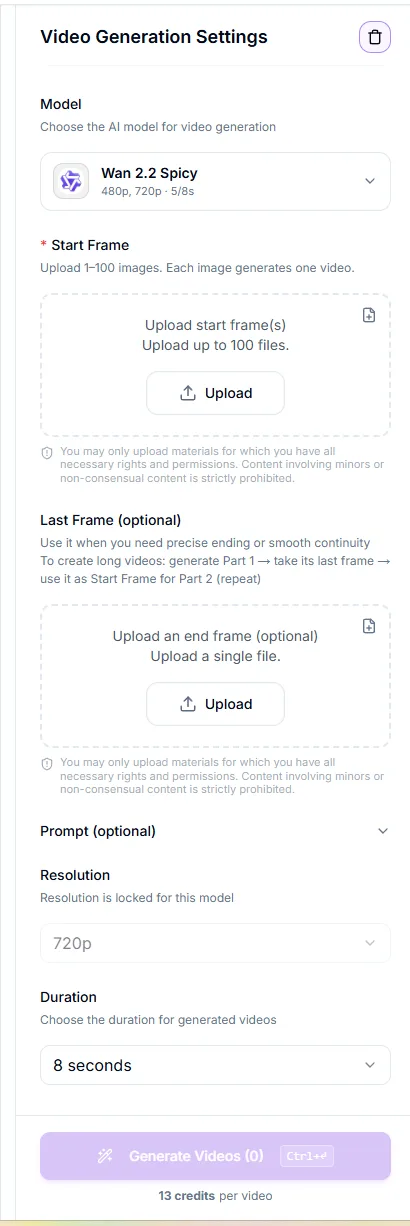
With a good still in hand, we hit “Send to another tool” and chose Image-to-Video. First friction point: the optional “write a prompt” field is tucked away and took a moment to find - a small thing, but emblematic of the studio’s habit of hiding useful controls one click too deep. We added a motion prompt, picked Wan 2.2 at 5 seconds for 10 credits, and generated video 1. The result was “almost there” - close, watchable, not quite perfect.
Then we tried a different engine, Wan 2.7 Spicy, which offers an “enhance prompt automatically” option. At 720p, 5 seconds, another 10 credits, it produced video 2 - noticeably better. “Not bad,” as the notes put it, which from our perpetually-unimpressed tester counts as praise.
The video engines are where ZenCreator’s depth pays off. The settings panel alone tells you how seriously it takes the format - engine, resolution, duration up to 8 seconds, separate start and end frames, and a neat trick for long clips: generate Part 1, take its last frame, feed it back in as the start frame for Part 2, and repeat.
Across a wider sweep of tools and engines the results were, honestly, about 50/50. The standouts that missed least: the Wan 2.7 engines and Wan 2.2 with LoRAs for video, and Flux Klein Spicy for stills. Which brings us back to the same lesson - the raw engines are a mixed bag, so lean on the proven combinations.
What a generation really costs, in dollars
ZenCreator skips subscriptions entirely: you buy one-time credit packs and spend them as you go, and they never expire. Here are the packs exactly as shown at checkout, July 2026:
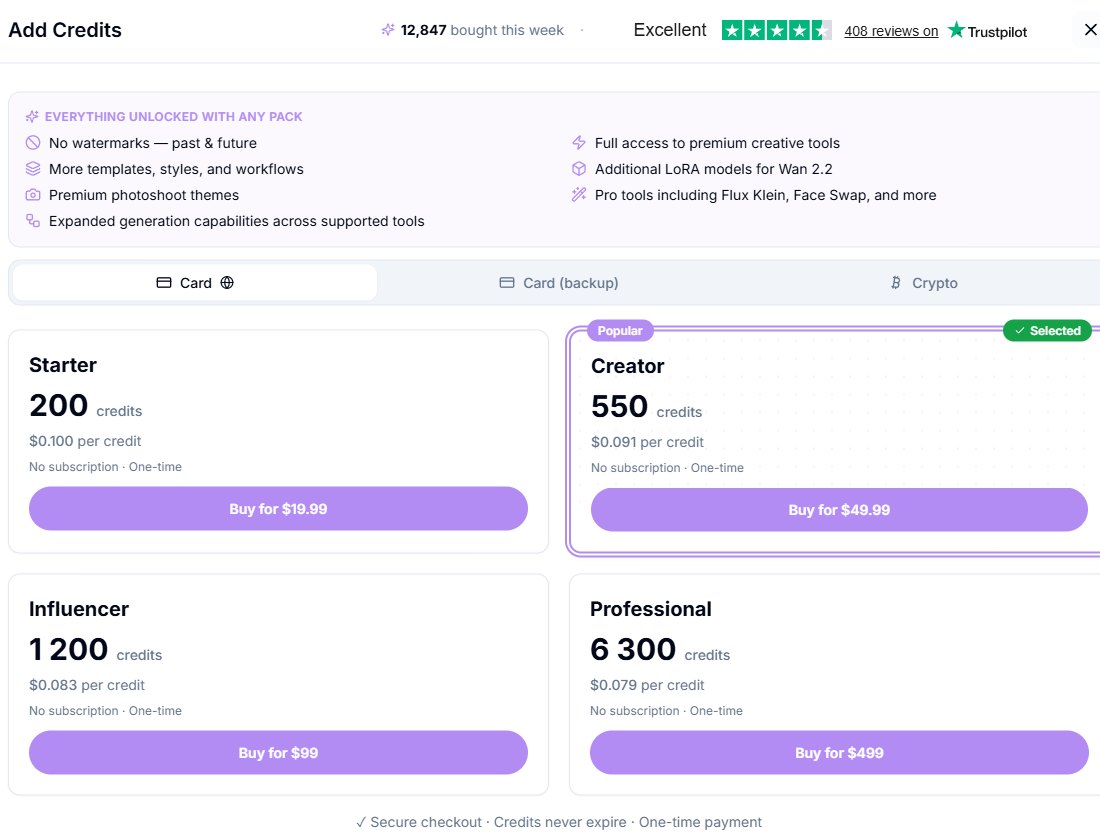
| Pack | Price | Credits · effective rate |
|---|---|---|
| Starter | $19.99 | 200 credits · $0.100 / credit (the most expensive way to buy, and the cheapest way in). |
| CreatorPopular | $49.99 | 550 credits · ≈ $0.091 / credit. The tier ZenCreator pushes, and a fair middle. |
| Influencer | $99 | 1,200 credits · ≈ $0.083 / credit. |
| Professional | $499 | 6,300 credits · ≈ $0.079 / credit (best rate, for heavy AI-influencer use). |
The dollar spread per generation
This is the part nobody else publishes, so we did the math. Costs below run from the cheapest pack (Professional) to the most popular (Creator) to the priciest small pack (Starter):
Credit costs are the app’s quoted per-generation amounts converted at each pack’s effective rate. Higher resolutions, longer durations and audio-enabled engines cost more credits than the baselines shown here.
A photo costs pennies and a 5-second explicit clip costs about a dollar. The value problem isn’t the per-clip price - it’s the $19.99 you spend before you know if any of it works for you.
For context: on Seduced AI a text-to-video clip can run up to ~$5 and there’s no trial either. ZenCreator’s clips are a fraction of that and its credits never expire - so once you’re past the cover charge, it’s one of the better-value studios here. The only genuine value knock is the total absence of a free tier.
The scorecard
ZenCreator graded against our 10-point rubric.
The ceiling is high - Flux Klein Spicy and WAN 2.7 Pro produce genuinely photoreal, 2-4K nudes. But the floor is low: the same prompt failed on several engines, so consistency depends on picking the right one.
Deep and capable - Wan 2.2/2.7 Spicy, Seedance and Grok, with start/end frames, LoRAs, audio and clip-chaining for long videos. Results were roughly 50/50 in a broad sweep; Wan 2.7 missed the least.
The most control in the category by a distance: 15+ named engines, body-shape LoRAs, resolution and duration options, start/end frames, an API and an MCP server. Occasionally too much.
Eight of nine image engines uncensored, unrestricted Wan video, dedicated Female/Male undressers and face-swap. Among the most permissive studios we’ve tested, and refreshingly upfront about which engines filter.
“Send to another tool” reuse, a General engine tuned for a consistent face, and Face Swap help - but single free-form prompts drift heavily between engines. Templates are the reliable path to consistency.
The weak point. Powerful but overwhelming, with useful controls buried a click too deep. Our tester’s verdict: a tool for professionals, not for someone who came to have fun.
Cheap per clip (a 5s video ≈ $1), credits never expire, no subscription, plain card checkout, no watermarks. Genuinely good value - once you’re past the entry cost.
The worst score here. Zero free credits means a mandatory $19.99 before your first generation, and the sheer depth makes onboarding steep. The templates and AI University help, but you pay to reach them.
Enormous: undress (both sexes), face-swap, photoshoot, image editor & combiner, upscalers, lipsync, video-to-video, video merger, variations, collabs, plus API/MCP. The most tools of any studio we’ve reviewed.
Card checkout, strict adult-template gating and an explicit consent notice on uploads (no minors, no non-consensual content). But undress and face-swap on uploads create real deepfake-abuse potential that rests on the user to avoid.
Adult content capability matrix
Exactly what ZenCreator will and won’t do.
| Explicit / unrestricted still images | ✔ Yes (use Flux Klein Spicy) |
| Realistic nudity & photoreal stills | ✔ Yes - 8 uncensored engines |
| Image-to-video (explicit) | ✔ Yes - Wan 2.2/2.7 Spicy |
| Text-to-video (explicit acts) | ✔ Yes |
| Undress / “nudify” an uploaded photo | ✔ Yes (male mode too) |
| Face / head swap into a photo | ✔ Yes |
| Body-shape control via LoRAs | ✔ Yes (SDXL + Wan 2.2) |
| Audio / sound on video | ✔ Yes - Wan 2.5/2.6/2.7 + Audio |
| A safe / filtered mode if you want one | ◑ Yes - Kling engines & Nano Banana 2 |
| Free generations to test first | ✗ None - pay before you generate |
| Real-person likeness of non-consenting people | ✗ Don’t - abusive, prohibited & often illegal |
Pros & cons
What we loved
- The widest bank of engines in the category - 15+ named models for image and video
- Genuinely transparent - every engine labelled with resolution, cost and an uncensored/censored badge
- Hundreds of templates, each tagged with the engine it runs on
- Fully uncensored across image and video, with body-shape LoRAs
- Cheap per clip - a 5-second video costs roughly a dollar; photos cost pennies
- Credits never expire · no subscription · no watermarks · plain card checkout
- A deep pro toolbox: undress, face-swap, photoshoot, lipsync, video-to-video, API and MCP server
What let us down
- Zero free credits - a mandatory $19.99 before your first generation
- Steep learning curve - “a tool for professionals, not for fun”
- Hit-or-miss output - one prompt failed on five engines before the sixth nailed it
- Useful controls (like the optional video prompt) are buried a click too deep
- Best results really need the templates or a known-good engine - free-form prompting is a coin-flip
- Undress + face-swap on uploads enable real-person deepfake misuse
Who it’s for - and the final verdict
✅ Get ZenCreator if you…
- Want the most engines, tools and LoRAs of any uncensored studio, in one place
- Are a hands-on creator happy to learn which engine wins - Flux Klein Spicy, Wan 2.7 and friends
- Value transparency - knowing exactly which model and filter level you’re using
- Want cheap per-clip video and credits that never expire, with no subscription
- Need pro plumbing - an API, an MCP server, batch generation and a publishing pipeline
❌ Look elsewhere if you…
- Want the easiest path to explicit content - that’s SecretFlame
- Expect to try before you buy - there’s no free tier at all
- Want reliable one-click results without learning the engines
- Want a chatting AI girlfriend - there’s no companion layer (that’s Candy AI)
- Refuse to touch a tool with undress / face-swap capabilities on principle
ZenCreator is the enthusiast’s uncensored studio. Nothing else we’ve tested gives you this many engines, this much control, or this much honesty about what’s running under each button - and once you’re past the paywall, it’s cheap and permissive in exactly the ways that matter. But that power comes with a bill and a learning curve: twenty dollars before your first image, and a real chance your first few prompts miss until you find the right engine or reach for a template. If you’re a creator who wants to build, it’s a joy. If you just want a quick, uncensored result with no homework, start with SecretFlame and graduate to this.